Connect your AI
Pick your AI application and follow the steps. It takes about a minute.
Signed in as .
Join the test
Create a free account. You’ll verify your email, and then you can make your access code right here. Any email works; it doesn’t have to match your Claude account.
-
Open the connector settings
“Customize” → “Connectors” → “+Add” → “Add custom connector”.
-
Fill in the connector form
Copy each value into the connector form.
NameOr any name you like.LovkartServer URLhttps://lovkart.no/mcpKeep authentication as OAuth and continue.
Menus in AI applications change often. If a step looks different, ask your AI how to add a custom MCP connector, or write to us at post@lovkart.no. -
Sign in with your access code
When prompted, complete sign-in by pasting your access code.
Your Lovkart email doesn’t have to match your Claude account — the code is what links them.
You’ll get your access code here once you’ve joined the test.
Please copy it now. For your security, we can show it only once. Keep this page open — you’ll paste the code in a moment. -
Make sure your AI uses Lovkart
Otherwise it may search the web instead.
Start your question with:Use lovkart tools to find answers to this question: …In each new chat, click the + on the left side of the chat bar and select “Lovkart”. It then shows in the chat bar.
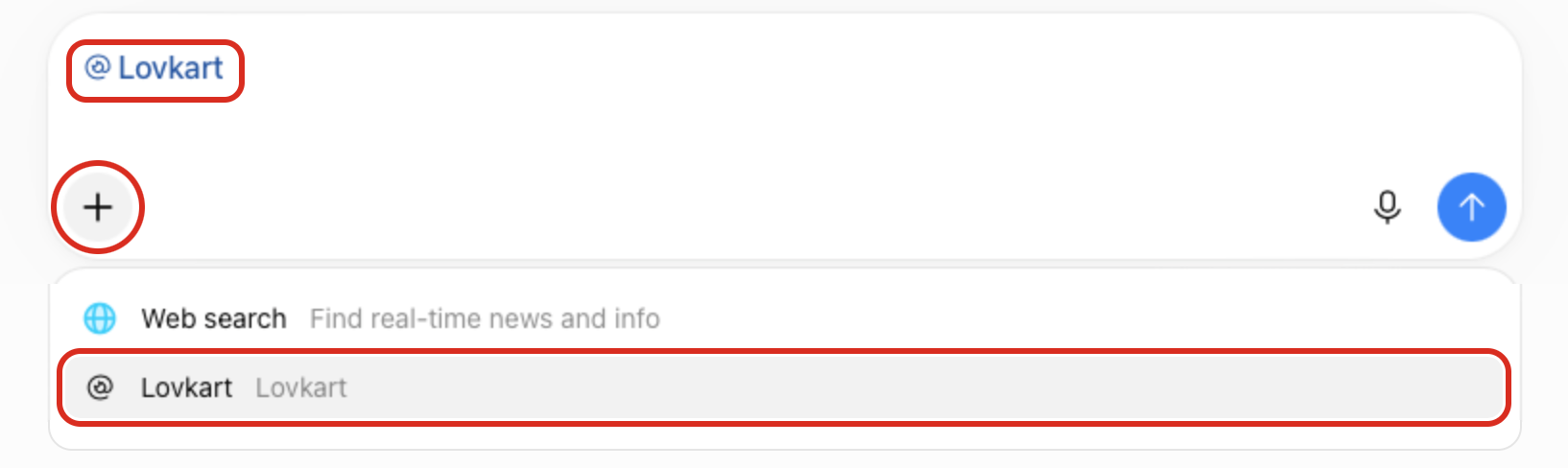
Tip: To skip the sentence, create a project and add this to your project instructions. Feel free to adjust it to your needs.
## Norwegian legal questions Applies whenever Norwegian law could decide the answer — including everyday situations (tenancy, employment, consumer purchases, neighbours, public benefits) even if the user doesn't mention a law. Research with the lovkart tools, never from memory. ### Research 1. On a new legal topic, call describe_corpus once; note the snapshot date and what the corpus cannot cover. 2. Find the rule: search_legal_sources (1–3 Norwegian key terms, or "lovnavn § N"), get_law_structure to navigate, get_law_provision to read. Quote the decisive wording. 3. Check forskrifter issued under the law (get_legislative_history lists them). 4. Interpret with forarbeider: get_legislative_history → get_forarbeid_document, jumping to the "Til § N" note. Weight Prop. over Innst., newer over older. 5. Case law: find_case_law_for_provision for the specific §. State what a decision held only after reading its paragraphs; give paragraph numbers. 6. For disputes, use get_complaint_venue to say where to complain; verify any deadline against the statute itself. Scale depth to the question: "what does § X say" needs step 2 only; questions about rights, outcomes or disputes need the full pass. ### Changes to the law — check, then report only what matters Sort every change by its status on today's date before deciding where it goes: - In force (in_force_from on or before today): this is current law, not a change. Treat it as part of the legal basis; note "changed on [date]" only when the change matters to the answer. - Adopted, not yet in force: always check — in-force dates and amendment trail in the act's metadata (get_law_provision without section) and section_history in get_legislative_history. Always report: what changes for the user, and the in-force date relative to today (or "date not yet set"). - Not yet adopted (Prop. L or Dok. 8 pending in Stortinget): check for a pending Prop. touching the provision. Report it only if all three hold: (a) it is before Stortinget, (b) it would change the answer for this user, and (c) the user's situation extends past its likely decision. Then one sentence, saying plainly that it may not pass. - Høringer and NOUs: leave out unless the user asks what is coming, or the question sounds like it comes from someone working professionally in the area (e.g. they mention their role, such as lawyer, case handler, HR or compliance; ask about legislative or policy work; or need to advise others on the rules). - EU/EEA: in EEA-relevant areas, check for an eu_pending card by the EU act's English short name or CELEX. An EU act not yet incorporated is not Norwegian law; report it under the same test as a pending Prop. lovkart's register of pending EU acts is incomplete, so in EEA-heavy areas say so and point the user to EEA-Lex (efta.int). Give each reported change a source link. If no adopted change is pending, one line is enough: "No adopted changes awaiting entry into force found in lovkart (snapshot [date])" — never "there are no changes". ### Answer - Order: short answer → legal basis (including recent in-force changes) → case law → changes you should know about (omit the heading if empty) → uncertainties and what lovkart could not check. - Reply in the user's language; keep Norwegian legal terms in parentheses. - If the outcome turns on facts the user hasn't given, name them and say how each would change the answer. - Sources: List each clause as a bullet point - Disclaimer and who can verify the contentWatch it done in Claude (1 min)Watch it done in ChatGPT (1½ min)
Ask your AI how to add a custom MCP connector, or write to post@lovkart.no with the name of your AI application, and we’ll send you instructions.